
Shifts, holidays and the work week
How to create shifts, assign them to employees, schedule public holidays, and how both relate to the organization work week in H2R Core.
Last updated:
Three things decide how H2R Core judges a day: the organization work week, the holiday calendar, and each employee’s shift. Attendance, leave day counts and overtime all read from them.
The work week
Under Settings > Work Week & Calendar, an Owner or Admin chooses the working days (between 1 and 6, so at least one day off), which day the week starts on, the fiscal year start and the time zone. Nothing is fixed: Sunday to Thursday, Monday to Friday or any other pattern works. Leave counts, absent and holiday marking and calendars use this week unless an employee’s own shift defines its own working days. Changes are saved on the platform and Core picks them up within about five minutes, or immediately if you use Refresh Core now. More in work week and calendar.
Note: Payroll is not changed by the work week page. Working days / month in the payroll settings stays a manual setting.
Shifts
Open Shifts (Shift Management).
- Click New Shift.
- Enter the Shift Name, Start Time, End Time and Working Days.
- Set a Grace Period (minutes): the allowance before arrival counts as late.
- Optionally tick Set as default shift, and Night shift. The night flag drives the night-overtime pay tier in payroll settings.
- Click Create Shift.
To give someone a shift, click Assign Shift, choose the employee, the shift and a Start Date. Assigning a new shift automatically closes the employee’s previous open assignment the day before the new start date. Click Assignment History, choose an employee and Load to review past assignments.
Note: Shifts cannot be deleted from the screen today. Edit a shift or stop using it instead.
Holidays
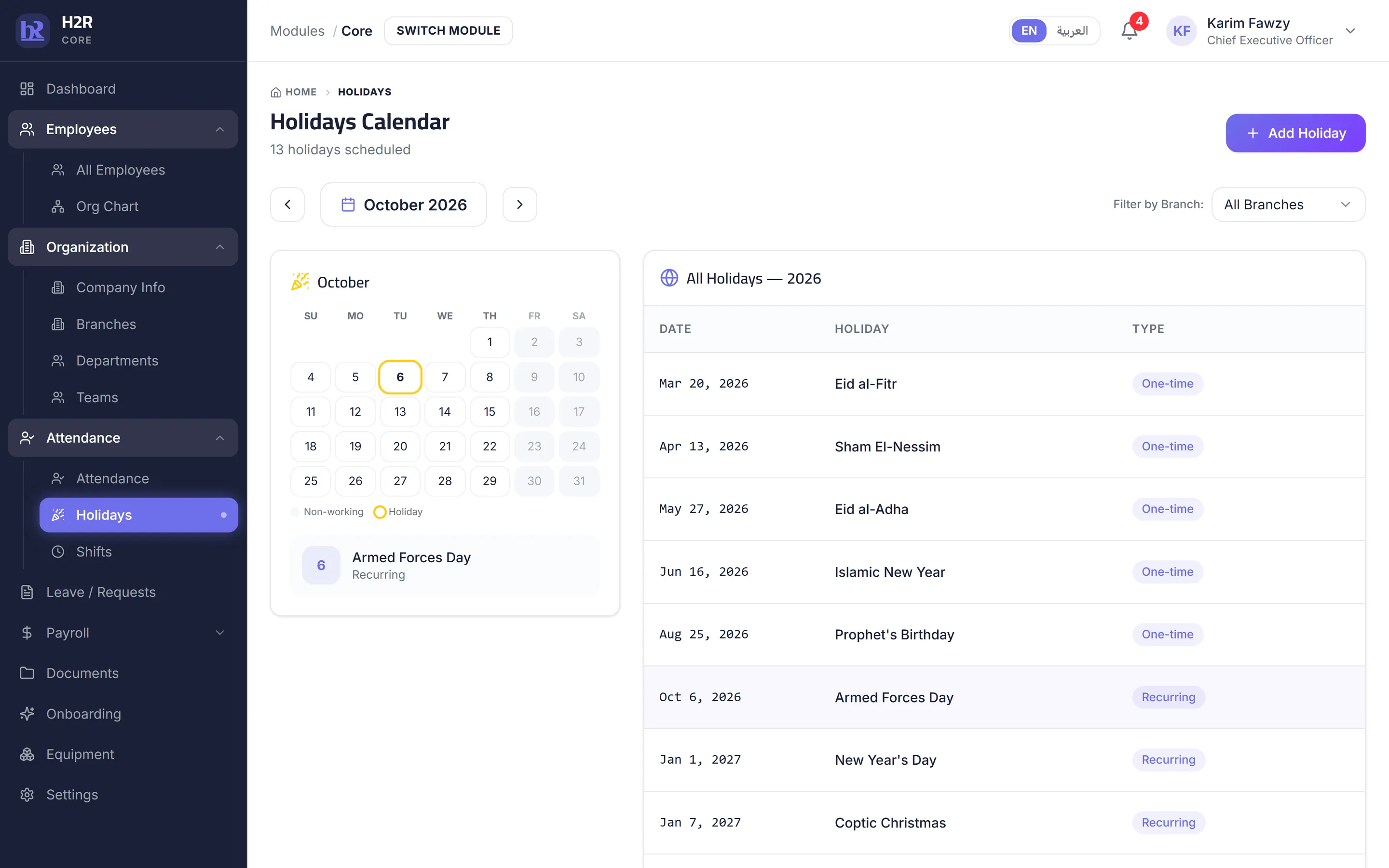
Open Holidays (Holidays Calendar) and click Add Holiday.
- Enter the Holiday Name and Date.
- Leave Branch (Optional) empty for All Branches (Global), or pick one branch.
- Tick Recurring annually for holidays that repeat on the same date, such as a fixed national day. Holidays that move each year are best entered as one-time holidays.
- Click Schedule Holiday.
If you pick a date that is already a weekend in your work week, H2R tells you. The list can be filtered by branch, and shows whether each holiday is Recurring or One-time.
Holidays are not counted as leave days and are not marked as absences. They also feed the holiday overtime tier.
Troubleshooting
- Everyone is marked late. Check the shift start time and grace period.
- A holiday counted as an absence. Confirm the date and, if you set a branch, that the employee belongs to it.
Questions people ask
Is the weekend fixed to Friday and Saturday?
No. The work week is configurable per organization. Many teams in the region work Sunday to Thursday, but you choose the days.
Was this article helpful?
Tell us in one line what was missing and we will improve it.
Related articles
Still stuck?
Send us a message with what you were trying to do and the screen you are on.
Contact support