
Plans, add-ons and billing
Learn how H2R subscriptions work per module, how to subscribe or change plan, buy add-ons, and who can manage billing.
Last updated:
H2R subscriptions are per module. Your organization chooses a plan for Recruitment, Performance and Core separately, so you pay only for what you use. This article explains how to manage that; the Billing page shows what each plan includes.
How plans work
Each module has plans such as Basic and Pro, sized by team and feature set. Higher plans include everything in the one below plus more features and higher limits. Larger organizations (100+ employees) can ask for a custom Enterprise plan, which our team sets up and manages with you through Contact us.
Plans include features (for example payroll or 360-degree feedback) and limits (for example number of employees). If you reach a limit or use a feature your plan lacks, H2R tells you and suggests upgrading.
Open Billing
Only the organization’s Owner or Admin can subscribe or buy add-ons.
- Open Choose an organization and use the billing action for your organization (or the link on an expired module).
- The Billing page opens with Plans & add-ons for each module.
Billing applies to the organization you are currently in. If it is not your active one, use the Switch to it link first.
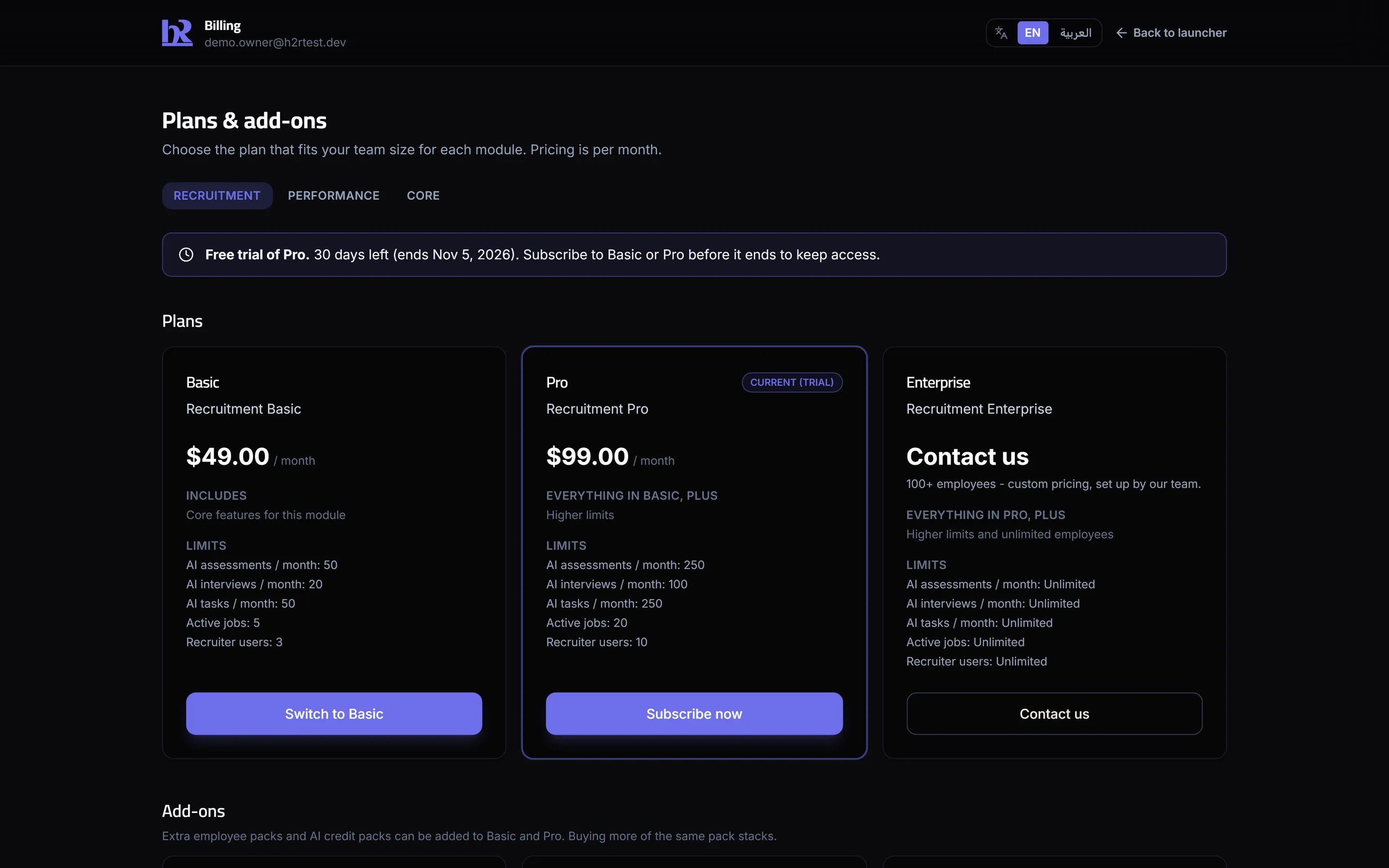
Subscribe or change plan
- Find the module and compare the plan cards. The current one is marked Current plan (or Current (trial)).
- Click Subscribe now, Switch to another tier, or Renew for your current plan.
- Complete the payment. You return to a page showing the Payment status.
Payment may take a moment to appear on your subscription. If a payment fails, no charge is made.
Add-ons
Add-ons extend a plan, for example extra employee packs or AI credit packs. They are available on Basic and Pro, need an active subscription to that module, and buying more of the same pack stacks. Choose the quantity and click Purchase.
Common problems
- No buttons on the page: you are not an Owner or Admin; ask the owner.
- “Not available on your plan”: that add-on does not apply to your tier.
- Add-ons disabled: renew or subscribe to the module first.
- Plan changed but limits unchanged: reload; if it persists, contact support.
What happens when a trial or plan ends is in Trial and subscription status.
Was this article helpful?
Tell us in one line what was missing and we will improve it.
Related articles
Still stuck?
Send us a message with what you were trying to do and the screen you are on.
Contact support