
Use the 9-box talent grid carefully
How H2R Performance places people on the 9-box grid from released review results, how to set the thresholds, who can see it, and how to use it fairly.
Last updated:
The 9-box grid sorts people by two questions: how well they are performing now, and how much room they have to grow. In H2R Performance it is not filled in by hand. People are placed automatically from the results of a review cycle, and you can see it under Talent.
Where the placement comes from
- Performance comes from the person’s final rating, after calibration.
- Potential (Low, Medium or High) is the potential rating recorded during Calibration in the review cycle. See review cycles.
Someone is placed only if their review in the latest released cycle has both a released final rating and a potential rating. Everyone else is listed under Not placed, including people who were not in the cycle. The grid says which cycle it is based on and when it was released.
Read the grid
Open Talent (the page is titled Talent Strategy) and the Talent Calibration tab. Potential runs down the rows and performance across the columns. Each box has a name:
| Potential | Low performance | Medium performance | High performance |
|---|---|---|---|
| High | Enigma | Future Star | Star |
| Medium | Up or Out | Core Player | High Performer |
| Low | Risk | Solid Contributor | Trusted Pro |
Click a person to see their final rating. Use the Department filter to narrow the view. The Team Members list under the grid shows everyone returned, placed or not.
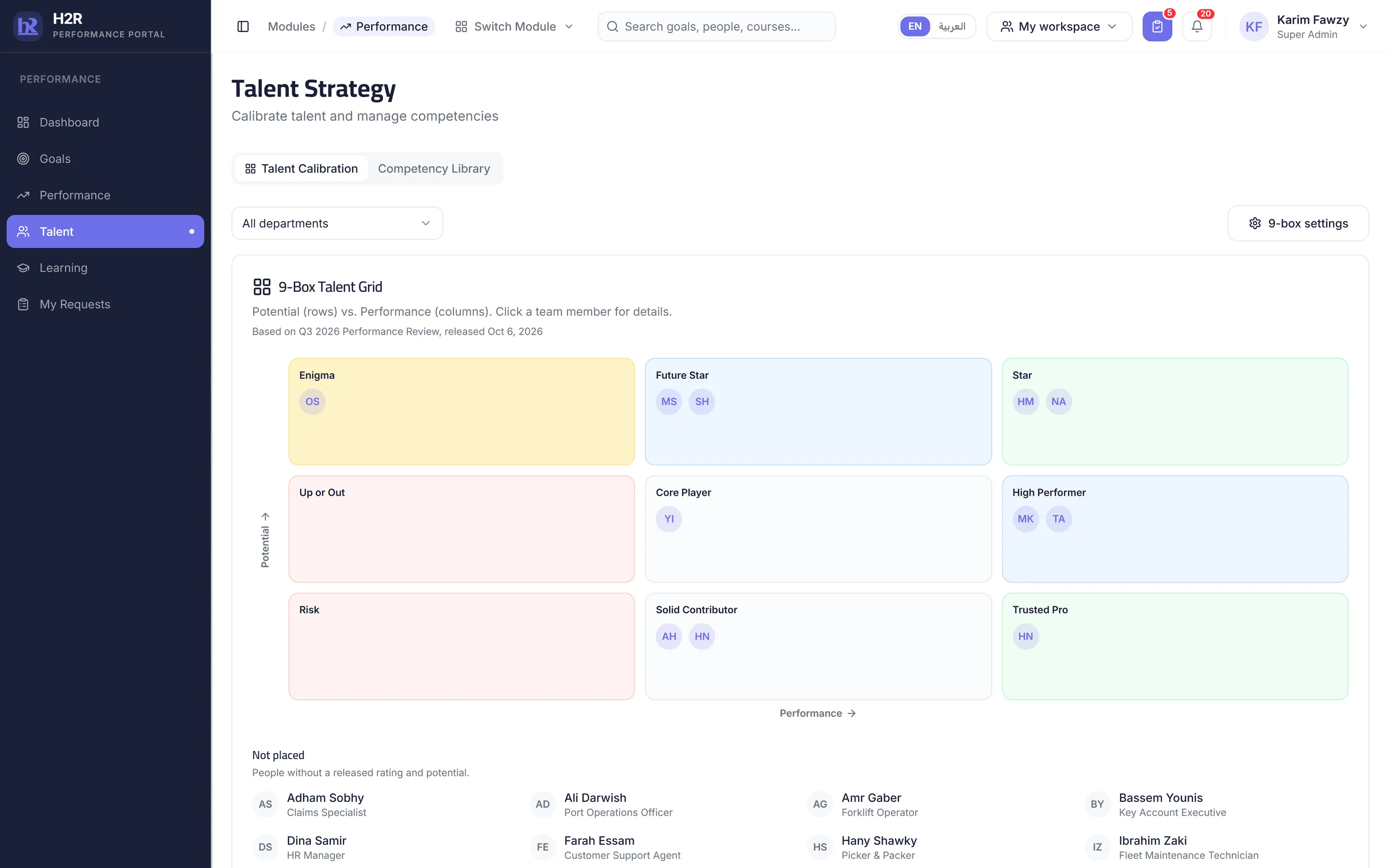
Adjust the thresholds
Click 9-box settings. Low below and High from turn a rating on the 1 to 5 scale into a performance band; ratings in between are Medium. The defaults are 2.5 and 4.0, and Low below must be lower than High from. The same dialog has Share my placement with employees, which is off by default. When it is on, employees can see their own position under My placement.
Who can see it
The grid is shown to people with calibration access. Managers see the people in their reporting line; HR and admins see the company; an HR partner with a limited scope sees only that scope. Without the sharing setting, your own row is visible only to company-wide HR and admins. Depending on your organization’s plan, the grid may be locked, and the page says so.
Use it carefully
- Treat a box as a starting point for a conversation, not a verdict. A rating is one manager’s view at one moment.
- Check the data first. A missing potential rating leaves someone in Not placed even if their performance is excellent.
- Use the same thresholds for everyone, and change them before a cycle is released rather than after.
- Do not share the grid screen with people who lack access, and decide as an organization whether employees see their own box.
- Pair it with development: goals, learning and career roles, not only succession lists.
Troubleshooting
- The grid is empty. No cycle has been released with ratings yet. Release results first.
- Not available for your role. Ask an admin for calibration access.
- Someone is in the wrong box. Check their final and potential ratings in the cycle’s calibration tab; adjustments recorded there change the placement.
Was this article helpful?
Tell us in one line what was missing and we will improve it.
Related articles
Still stuck?
Send us a message with what you were trying to do and the screen you are on.
Contact support