
Payroll looks like a single number at the end of the month, but that number is the result of a chain of smaller decisions. Knowing what goes into it makes errors easier to spot and conversations with employees easier to have.
This post explains the concepts behind a payroll run and how H2R Core models them. It is not legal or tax advice. Rates, brackets, insurance contributions and entitlements are set by law and change over time, so we deliberately do not quote any here. Confirm the current rules with your company’s accountant or legal advisor.
The building blocks
Basic salary and allowances
The basic salary is the fixed base amount agreed for the role. Allowances are additional fixed components on top: transport, housing, a mobile allowance, a role allowance. Companies often split pay into several lines like this, and the split can matter for how other amounts (such as certain deductions or end-of-service) are calculated. Which components count towards which calculation is a question for your accountant, then you configure it once in the salary structure.
Deductions
Deductions reduce what the employee takes home. They fall into broad groups:
- Statutory deductions, such as taxes and social insurance contributions, set by law.
- Company deductions, such as an absence penalty or a recovered advance.
- Voluntary deductions, such as a loan repayment the employee agreed to.
Some of these are fixed amounts and some are calculated from other numbers. Your accountant tells you which apply and how; the system applies them consistently.
Gross to net
Gross is the total earned before deductions (basic plus allowances plus any additions such as overtime). Net is what remains after deductions and is what is paid out. A payslip should let the employee follow that path from top to bottom without a calculator.
The inputs that change every month
The fixed parts of a salary structure rarely move. The variable parts are where most errors come from.
- Attendance. Days worked, absences and late arrivals. If clock-ins are recorded in the system, payroll can use them instead of a sheet someone retyped.
- Leave. Paid leave counts as worked time, while unpaid leave usually reduces pay. Approved leave should reach payroll automatically, which is a good reason to keep approvals inside one system.
- Overtime. Hours beyond the shift, usually paid at a multiplier your policy and the law define. The risk is estimating overtime instead of recording it.
- One-offs. A bonus, a correction from last month, an advance being recovered.
Tip: Before each run, close the month’s attendance and leave first. A payroll run that starts with open or disputed attendance will need to be redone.
End-of-service
When someone leaves, they may be owed an end-of-service amount. How it is calculated depends on length of service, the pay components that count, and the reason for leaving, all of which are matters of law and contract. H2R Core includes an end-of-service calculator so you can estimate it consistently from the employee record, but treat the result as a working figure and have your advisor confirm it for anything contested or unusual.
The payroll run lifecycle
A payroll run in H2R moves through four steps, and each one has a purpose:
- Create. Choose the period and the employees included. This pulls in the salary structure.
- Calculate. The system combines the structure with attendance, leave, overtime and one-offs and produces gross, deductions and net for each person.
- Approve. A reviewer checks the totals and any exceptions. By default this is a different person from whoever created the run.
- Publish. The run is finalized and payslips become available to employees.
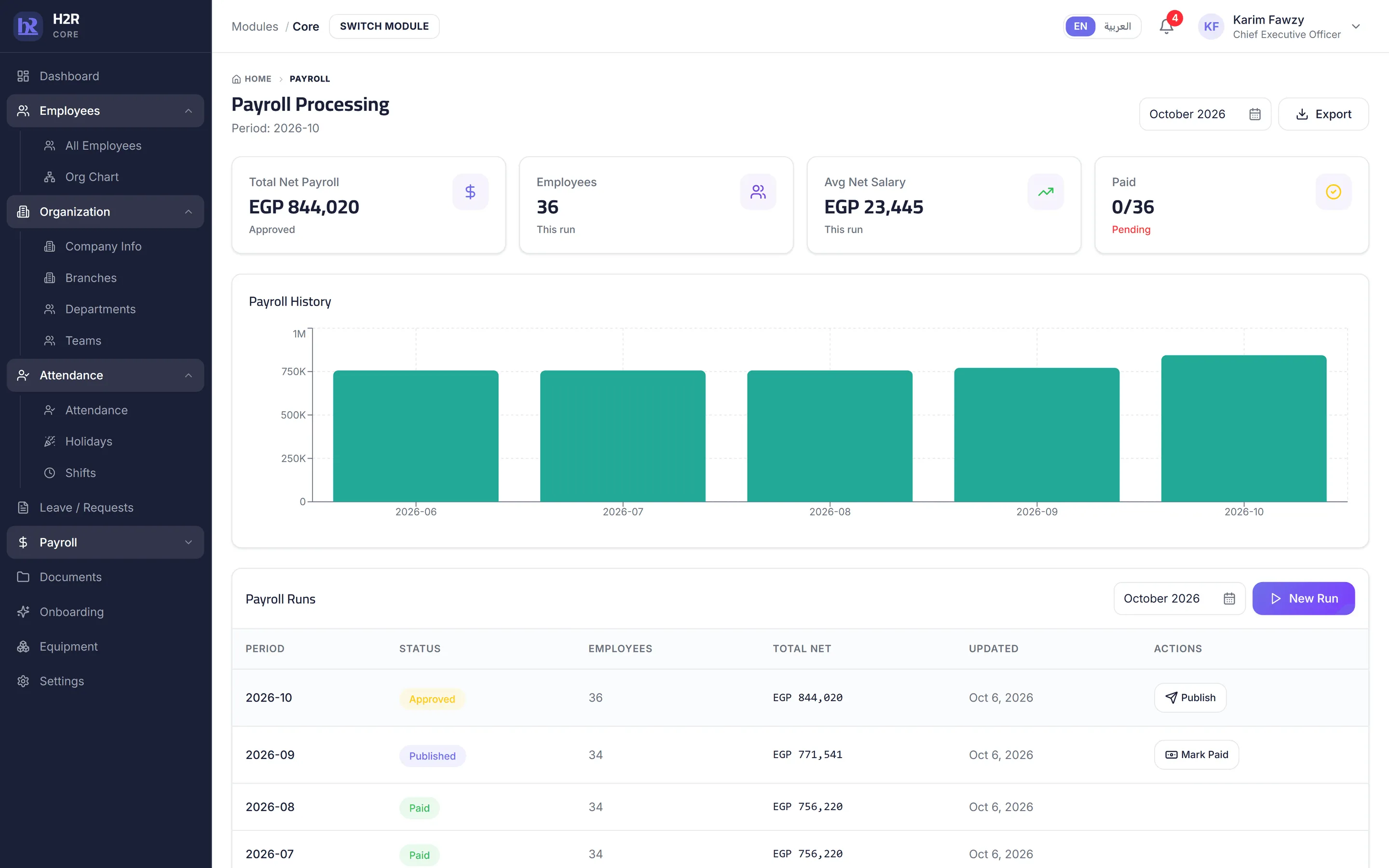
The gap between calculate and approve is where the work is. Look at outliers: someone paid zero, someone paid double, a new joiner with a full month, a leaver with no end-of-service line. Comparing against last month’s totals catches most mistakes in a few minutes. The full flow is in the payroll run lifecycle article, and payslips explains what employees see.
Separation of duties
In a larger company, one person should not be able to prepare, approve and publish their own payroll. H2R enforces separation of duties by default for exactly this reason. If you are a solo owner or a very small team and cannot split roles, an organization can relax the setting; approval settings for small teams explains the trade-off, and our post on separation of duties in small teams covers how to compensate with other checks.
The Egypt preset
Setting up a salary structure from a blank page is slow and easy to get wrong. H2R Core includes an Egypt preset that gives you a starting structure with the components commonly used in Egyptian payroll, so you are adjusting rather than inventing.
Be clear about what that means:
- It is a starting point, not a statement of current law.
- You review each component and value against what your accountant gives you.
- When rules change, you update your structure; do not assume the preset has changed for you.
You can see how it fits the wider product on the Egypt payroll solution section.
A short checklist for each run
- Attendance and leave for the period are closed and approved.
- New joiners and leavers are reflected in the employee list.
- One-off additions and deductions are entered, with a reason.
- Totals are compared with the previous run; differences are explained.
- The approver is not the preparer (or you have another check in place).
- You have reviewed payslips for a few employees before publishing.
Common mistakes
- Retyping attendance into the payroll sheet. Every manual copy is a chance for a wrong number.
- Changing a salary mid-month without a date. Record the effective date.
- Treating the preset as final. Always verify with your accountant.
- Publishing before reviewing. Employees see payslips on publish.
If you want to try a first run with your own data, follow the guide to run your first payroll.
Questions people ask
Does H2R tell me which tax and insurance rates to use?
No. H2R provides an Egypt preset as a starting point for your salary structure, but rates and rules change, so confirm the current values with your accountant or legal advisor before you rely on them.
Who should approve a payroll run?
Someone other than the person who prepared it. H2R separates these duties by default, and an organization such as a solo-owner business can relax that setting.
Can I correct a mistake after publishing?
Review a run carefully before publishing, because employees can see payslips once it is published. See the payroll run lifecycle help article for how corrections are handled.